

3. Signature Session (/signature)
Description
Initiates signing session.
User receives the following request in the application.
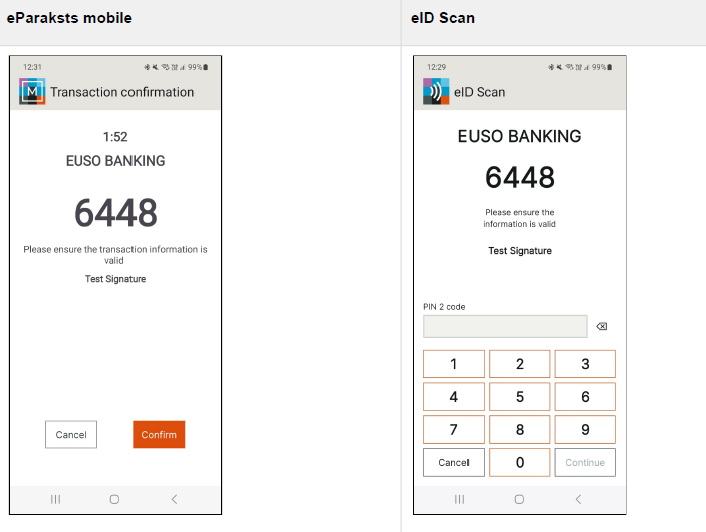
Request
To start the operation, make a HTTP POST request containing an application/x-www-form-urlencoded body to an HTTP URL of the following form:
https://{service}/v1/signature
Authorization
In the Authorization header, include the API key you were given. See API Authorization] for more information.
Request parameters
Certain parameters are required in the HTTP request.
| Name | Type | Use | Description |
|---|---|---|---|
| person_identifier | POST | Required | Person identifier according to ETSI Natural Person Sematics Identifier specified in ETSI319412-1. Format PNOLV-XXXXXX-XXXXX. |
| certificate_label | POST | Required | Label of the certificate that must be used for generating the signature. See [Certificates Session] for supported values and more information. |
| digest_value | POST | Required | Hash of the document to be signed. Encoded in Base64. |
| digest_algorithm | POST | Required | Hash algorithm used to calculate the hash of the document (sha256, sha384 and sha512). |
| message | POST | Required | Message displayed to the user to prompt them to authorize the creation of the signature. Up to 300 characters of text. The newline character '\n' represents a line break. |
| force_pin | POST | Optional | Request to use PIN code, biometrics not allowed. If this parameter is omitted or value other than "true" is provided, biometrics is also allowed. |
Certificate object is not required for signature operation as it is selected automatically from the associated user.
Verification code
See Verification Code for more information.
Request headers
The following Headers must be present in the HTTP request:
- Content-Type - application/x-www-form-urlencoded content type.
Content-Type: application/x-www-form-urlencoded; charset=UTF-8
- Authorization - API key.
Authorization: Basic <API-key>Request body
The body must be an application/x-www-form-urlencode entity, containing all of the
required parameters.
Response
A response with a 200 OK status specifying that the operation was processed correctly will be
returned.
Example
HTTP/1.1 200 OK
Content-Type: application/json

{JSON-DATA}
In case of error, the response will indicate a status other than 200 OK.
In such case, the response will contain additional information on the error cause. See [Handling API Errors] for more information.
Example
HTTP/1.1 400 Bad Request
Content-Type: application/json
{
	"error" : { "value": "unauthorized" }
}
Response parameters
The response is a JSON representation with the following parameters.
| Name | Use | Description |
|---|---|---|
| session_id | Required | Unique identifier of the prepared session to be used in the subsequent API operation calls. See [Session Result (/session)] for more information. |
Esponse headers
The following Headers may be present in the HTTP response:
- Content-Type - JSON format;
Content-Type: application/jsonUpdated about 1 month ago