

PortalSign integration guidelines
These guidelines are intended for LVRTC partners who want to integrate in their solution signing interface of the www.eparaksts.lv. Service provides a REST query to call the www.eparaksts.lv, where the user performs electronic document signing. After signing the document, the user is returned to the system from which the signing process was started. The service uses Basic authentication, which is part of the HTTP protocol.
Service Call Parametrs
| Name | Type | Usage | Description |
|---|---|---|---|
file | file | Mandatory | One or more files. The service determines the file format from the Content-Type header of the multipart file part, not from the file contents or its extension. Most HTTP clients set this header automatically based on the file extension. If the client in use does not do so, or sends application/octet-stream, the Content-Type must be specified in the request manually — otherwise the format will be determined incorrectly. |
return_to_uri | text | Mandatory | HTTPS link to which the user must be redirected after document signing |
document_format | predefined value | Optional | edoc - the signed file will be in EDOC format asice - the signed file will be in ASICE format pdf – the signed file will be in PDF (PAdES) format. Available only if the source file is a PDF and the file part is sent with Content-Type: application/pdf (see the description of the file parameter). By default, PDF files remain PDF, all other formats become EDOC. |
sign_mode | predefined value | Optional | single - if there are multiple documents, they will all be signed in a single EDOC document Default is single. |
lang | predefined value | Optional | Interface language for the eparaksts.lv signing page. Default is lv. |
UML Data flow diagram
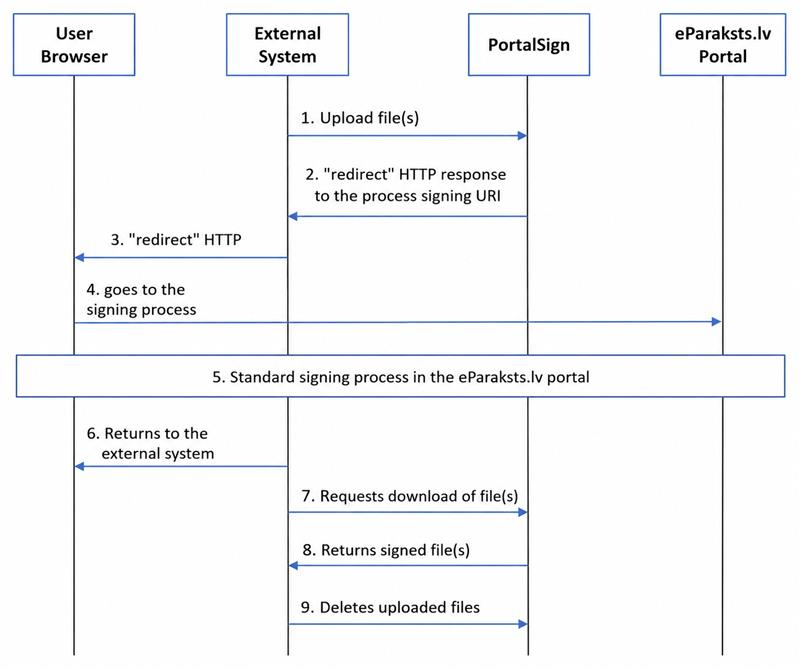
Comments regarding diagram
-
The external system uploads file(s) together with configuration parameters (return URL, format) to the PortalSign service. Basic authorization parameters must be specified in the request.
-
The PortalSign service returns a "redirect" HTTP response to the signing process URI in the portal (
redirect(Uri(s"$portalHost/parakstit/${process.uuid}"), StatusCodes.SeeOther)). -
The external system returns a "redirect" HTTP response to the client browser.
-
The client browser opens the corresponding signing process in the portal.
-
The standard signing process takes place in the portal, as described in other documents.
-
When the user clicks the button with the return URI in the browser, the user's browser goes to the external system.
-
The external system requests download of the signed document using process_uuid
https://www.eparaksts.lv/api/v1/portal-sign/\{process.uuid}/download-document -
The PortalSign service returns the electronically signed file(s).
-
The external system deletes the uploaded files by calling the DELETE method with the process ID:
https://www.eparaksts.lv/api/v1/portal-sign/\{process.uuid
If, in step 4, the pageeparaksts.lv/parakstit/{process_uuid} is unavailable, the user will be redirected to the URL specified in the return_to_uri parameter, with the additional parameter error=service_not_available.
If, in step 5, the user cancels the signing process by clicking "Cancel", the user will be redirected to the URL specified in the return_to_uri parameter, with the additional parameter error=user_canceled.
SERVICE CALL SAMPLE (Postman JSON format)
The PortalSign service can also be tested using POSTMAN JSON requests. The service is available in the production environment. This means that a production environment eID card or eParaksts mobile can be used for testing.
Postman request to the PortalSign service (JSON can be imported as a Postman collection. After import, it will be necessary to specify a valid username and password in the Authorization section, as well as the file or files to be signed).
{
  "info": {
    "_postman_id": "279ac0cf-06ba-44bd-bdff-9b2a488ddde4",
    "name": "eparaksts PortalSign",
    "schema": "https://schema.getpostman.com/json/collection/v2.1.0/collection.json"
  },
  "item": [
    {
      "name": "PortalSign sample request",
      "protocolProfileBehavior": {
        "followRedirects": false
      },
      "request": {
        "auth": {
          "type": "basic",
          "basic": [
            {
              "key": "password",
              "value": "Parole",
              "type": "string"
            },
            {
              "key": "username",
              "value": "Lietotājvārds",
              "type": "string"
            }
          ]
        },
        "method": "POST",
        "header": [],
        "body": {
          "mode": "formdata",
          "formdata": [
            {
              "key": "document_format",
              "value": "pdf",
              "type": "text"
            },
            {
              "key": "sign_mode",
              "value": "single",
              "type": "text"
            },
            {
              "key": "flow",
              "value": "portal",
              "type": "text"
            },
            {
              "key": "return_to_uri",
              "value": "https://www.eparaksts.lv",
              "type": "text"
            },
            {
              "key": "return_to_uri_title",
              "value": "Return to your system",
              "type": "text"
            },
            {
              "key": "file",
              "type": "file",
              "src": "/home/testing.pdf"
            }
          ]
        },
        "url": {
          "raw": "https://www.eparaksts.lv/api/v1/portal-sign/upload-and-sign",
          "protocol": "https",
          "host": [
            "www",
            "eparaksts",
            "lv"
          ],
          "path": [
            "api",
            "v1",
            "portal-sign",
            "upload-and-sign"
          ]
        },
        "description": "Portal flow for signing a PDF document without changing the file format."
      },
      "response": []
    }
  ]
}
Postman response to the above request:
The response to the request can be found under <a href=
https://www.eparaksts.lv/portal-sign/7f37d82e-4b16-495c-b077-64197e330176
this URI</a> using a GET method.
A new signing process with a unique identifier has been created in the system
(example: 7f37d82e-4b16-495c-b077-64197e330176).
Next, it is necessary to paste the link https://www.eparaksts.lv/portal-sign/7f37d82e-4b16-495c-b077-64197e330176 into the browser and perform document signing.
After signing the document, the user arrives at the “Document is signed” window, where the “Return to system” button must be pressed. The user is redirected to the page specified as return_to_uri in the request.
The signed document can be downloaded from the link: https://www.eparaksts.lv/api/v1/portal‑sign/\{process_uuid}/download-document
After downloading the document, the external system deletes the document by calling the DELETE method with the process ID: https://www.eparaksts.lv/api/v1/portal-sign/{process_uuid}
SERVICE CALL SAMPLE (http command line client)
http --ignore-stdin --form --timeout 3600 POST \
  'https://www.eparaksts.lv/api/v1/portal-sign/upload-and-sign' \
  'return_to_uri'='https://company.lv/application1/form1.html' \
  'file'@/home/test_faili/dokuments.pdf \
  Authorization:'Basic ZGVtbzpkZW1v'
Example response:
HTTP/1.1 303 See Other
Location: https://www.eparaksts.lv/parakstit/a1cce99d-7678-45f2-9c95-975ef5659509
The response to the request can be found under <a href=https://www.eparaksts.lv/parakstit/a1cce99d-7678-45f2-9c95-975ef5659509 >this URI</a> using a GET method.
In this scenario, executing the GET request or opening the link in a browser opens the portal signing flow.
After electronically signing the file, the user is redirected to the page specified as the return URL in the service call.
Response status codes and explanation
| HTTP status code | Meaning |
|---|---|
303 See Other | The system has returned an intermediate result: a link that must be followed to continue the signing process. |
401 Unauthorized | An incorrect username and/or password has been provided. |
415 Unsupported Media Type | The service call is incorrect. The mandatory file parameter has not been specified. |
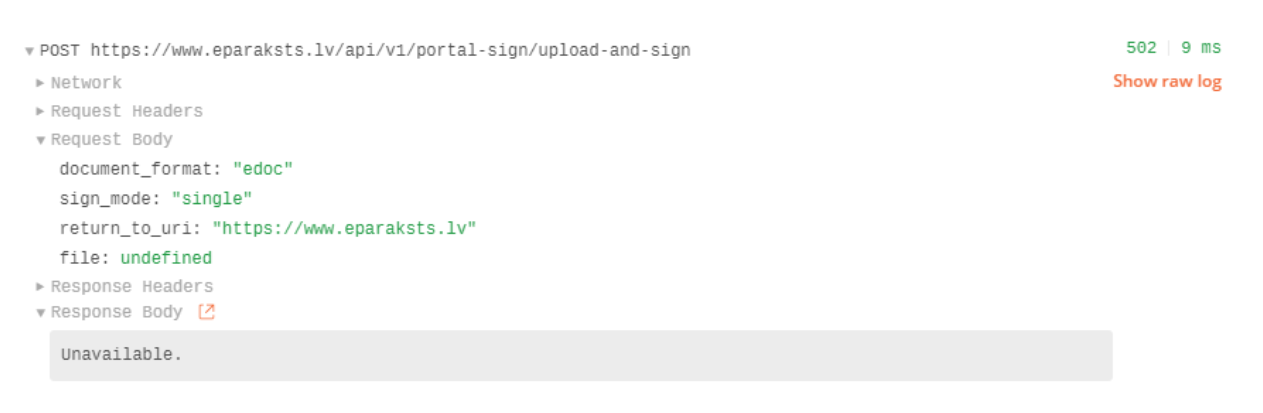
502 Bad Gateway | The PortalSign service is unavailable. The response also returns the message Unavailable. This may occur during planned system maintenance or service operation issues. |
Example of an incorrect call:
The following request does not include the mandatory file parameter:
http --ignore-stdin --form --timeout 3600 POST \
  'https://www.eparaksts.lv/api/v1/portal-sign/upload-and-sign' \
  Authorization:'Basic ZGVtbzpkZW1v'
Example response:
HTTP/1.1 415 Unsupported Media Type

The request's Content-Type [application/x-www-form-urlencoded] is not supported. Expected:

multipart/form-data
Example of HTTP status code 502 from Postman:
PDF signing error: “Converting the document for signing in PDF format is not available”
If the service call specifies document_format=pdf, but after clicking “Continue” the signing page displays the message “Converting the document for signing in PDF format is not available” and no document preview is shown, then the uploaded file has not been recognised as a PDF. Typically, without the document_format parameter the same file is signed successfully, only in EDOC format.
The cause is usually that the file part of the multipart request has no Content-Type header, or that it is set to application/octet-stream. The service determines the file format precisely from this header, not from the file contents or its extension. Most HTTP clients set the header automatically, which is why the error occurs only when the file is attached as a byte stream or the multipart request is constructed manually.
The solution is to send the file part with Content-Type: application/pdf. To verify this, in the raw request the line Content-Disposition: form-data; name="file"; filename="document.pdf" must be followed by the line Content-Type: application/pdf. The same file will then be signed, and the result is a PAdES PDF.
Updated 5 days ago